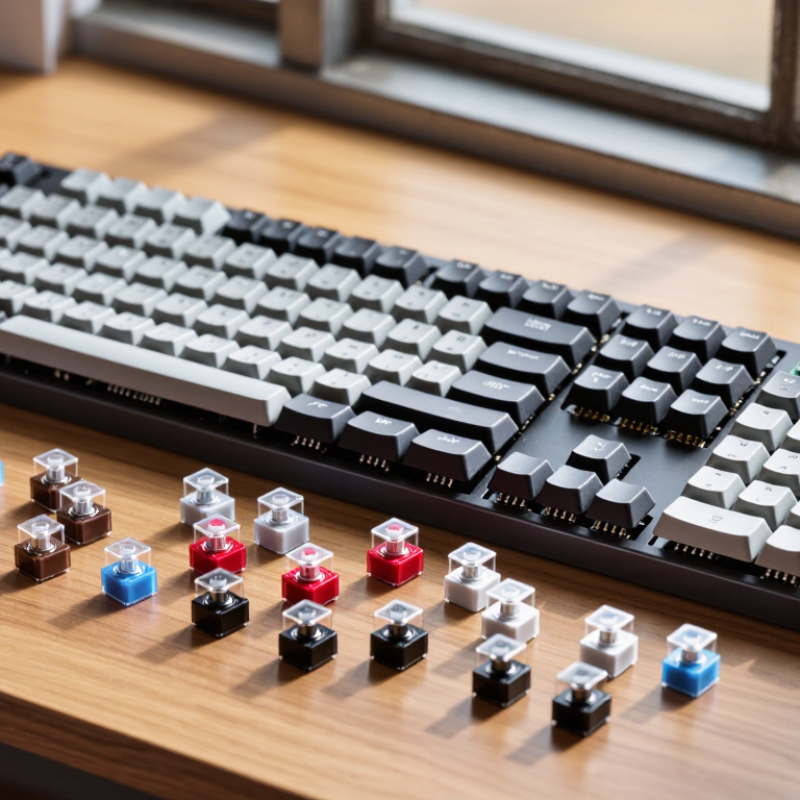
| Switch Feel and Sound |
| Key movement | Smooth and uninterrupted from the top of the press to the bottom. | Has a noticeable bump that signals the actuation point. | Has a tactile bump plus a separate click mechanism for audible feedback. | Choose based on whether you prefer smooth travel, physical feedback, or audible feedback. |
| Typical sound level | Low to medium; bottom-out and keycap noise still contribute. | Medium; sound depends on the housing, spring, keycap, and typing technique. | Medium to high because the click mechanism produces an additional sound. | For shared spaces, linear or quieter tactile designs are generally less intrusive than clicky designs. |
| Common use preference | Fast repeated input, gaming, and users who prefer a consistent press. | General typing, office work, and users who want feedback without a click jacket. | Users who enjoy a pronounced sound and clearly defined keystrokes. | Personal preference is more important than the switch label; test a small sample when possible. |
| Mechanical and Electrical Specifications |
| Typical total travel | Approximately 3.5–4.0 mm for standard-height designs. | Approximately 3.5–4.0 mm for standard-height designs. | Approximately 3.5–4.0 mm for standard-height designs. | Low-profile switches use shorter travel and require a compatible low-profile keyboard, plate, keycap, and socket system. |
| Typical actuation travel | Approximately 1.8–2.2 mm. | Approximately 1.8–2.2 mm. | Approximately 1.8–2.2 mm. | A shorter actuation point can feel faster, but it may also increase accidental presses for some users. |
| Typical operating force | Approximately 35–65 gf, with many standard designs around 45–55 gf. | Approximately 45–70 gf, including the force required to pass the tactile bump. | Approximately 45–70 gf, depending on the click mechanism and spring. | Lower force can reduce finger fatigue; higher force may help prevent unintended activation. Force curves matter more than one force rating. |
| Electrical actuation method | Metal contact leaves or an equivalent switch sensor changes the keyboard circuit state. | Metal contact leaves or an equivalent switch sensor changes the keyboard circuit state. | Metal contact leaves or an equivalent switch sensor changes the keyboard circuit state; the click mechanism is separate from electrical actuation. | Confirm that the switch is compatible with the keyboard’s sensing method. A mechanical hot-swap socket does not automatically support optical or magnetic switches. |
| Rated service life | Commonly rated from about 50 million to over 100 million actuations, depending on construction and test method. | Commonly rated from about 50 million to over 100 million actuations, depending on construction and test method. | Commonly rated from about 50 million to over 100 million actuations, depending on construction and test method. | Rated life is a laboratory estimate, not a guarantee of feel, sound, or contact performance over the entire service period. |
| Hot-Swap Compatibility |
| What hot-swappable means | The keyboard uses removable sockets, allowing compatible switches to be installed or replaced without soldering each switch to the circuit board. | Hot-swap capability belongs to the keyboard’s circuit board and sockets; it is not a property that every mechanical switch provides by itself. |
| Standard mechanical switch format | Many standard-height mechanical switches use an MX-style footprint with two metal electrical pins and one or more plastic positioning pins. | Check the number and position of pins, switch height, plate clearance, and whether the keyboard accepts 3-pin, 5-pin, or both formats. |
| 3-pin versus 5-pin | A 3-pin switch generally has two electrical pins and one central plastic guide pin. A 5-pin switch adds two plastic stability pins. | A 5-pin switch may be usable in a 5-pin PCB without modification. Some 5-pin switches can be converted to 3-pin by removing plastic guide pins, but this may reduce PCB-level stability. |
| Socket insertion requirement | Pins must be straight and aligned before insertion. Bent pins can fail to enter the socket or can damage the socket. | Install switches with the keyboard unplugged, support the PCB when needed, and avoid forcing a switch into place. |
| Lighting compatibility | Backlight performance depends on LED position, housing opacity, and whether the switch uses a compatible opening or light path. | For south-facing or north-facing LEDs, verify keycap clearance and the switch housing’s LED window to reduce interference or uneven lighting. |
| Stabilized keys | Long keys use stabilizers, which affect key feel and sound independently of the main switch. | A switch that feels good on a letter key may not eliminate rattle or stiffness on the spacebar, Enter, Shift, or Backspace keys. |
| Selection Guide |
| Choose linear when... | You want a smooth press with no tactile interruption, consistent repeated input, or a quieter baseline sound. | Prioritize spring weight, smoothness, wobble control, and bottom-out behavior. |
| Choose tactile when... | You want physical confirmation of actuation without the distinct click produced by a clicky mechanism. | Compare pre-travel, bump position, bump strength, and return force rather than relying only on the word “tactile.” |
| Choose clicky when... | You specifically enjoy an audible click and a strong, clearly defined typing event. | Consider room acoustics, microphone use, shared workspaces, and whether the click sound may disturb others. |
| Best first checks for a hot-swap keyboard | Confirm standard versus low-profile format, mechanical versus optical or magnetic sensing, pin layout, socket compatibility, and keycap clearance. | Buy a small sample or use a switch tester before purchasing a full set, especially when force, sound, or tactile intensity is important. |